You can limit AI usage in WordPress with monthly token limits. When ExactFind reaches a limit, it stops sending questions to your AI provider until next month, or until you raise it.
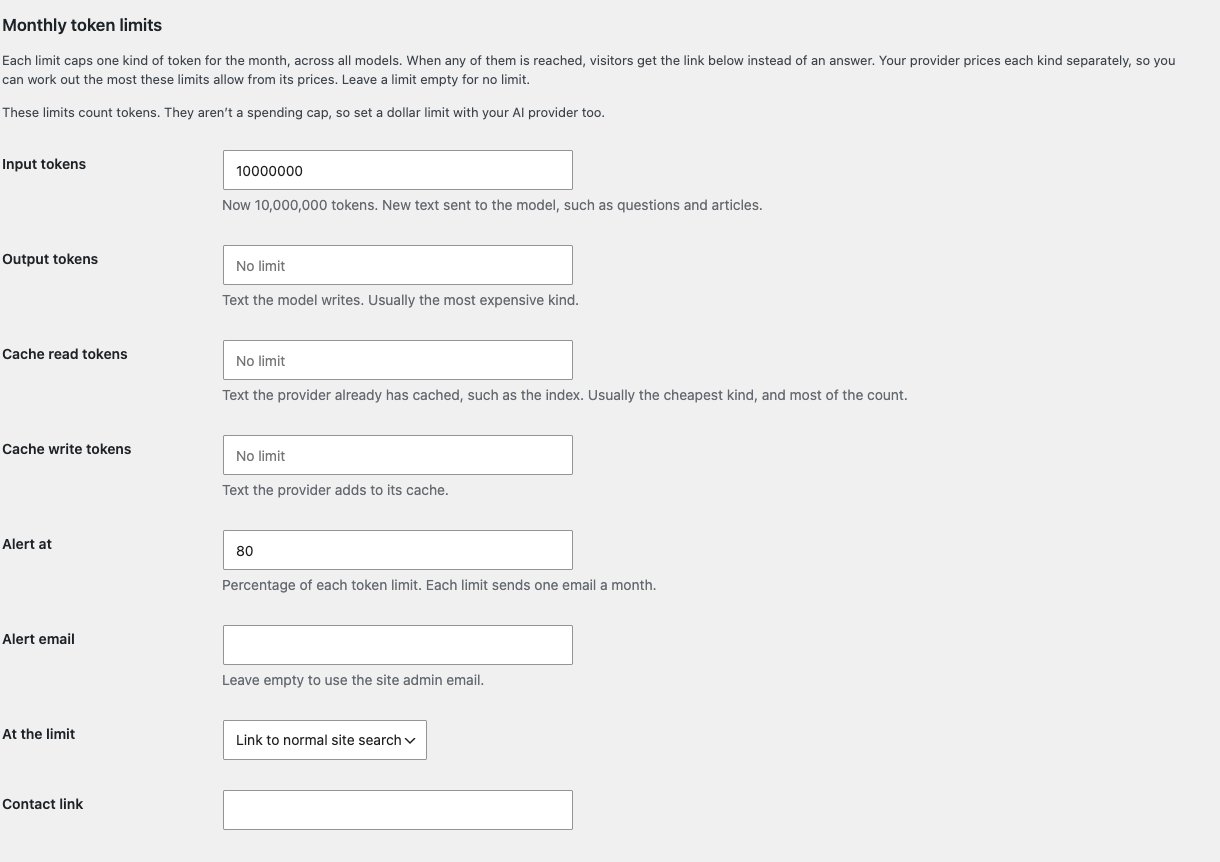
Go to ExactFind > Settings > Limits, then Monthly token limits.
What a token is
A token is a small piece of text, and AI providers charge by the token. Every question uses tokens for the instructions, your index, the article and the answer. Building the index uses them too.
Providers count four kinds of token and price each one separately:
| Kind | What it is |
|---|---|
| Input | New text sent to the model, such as questions and articles |
| Output | Text the model writes. Usually the most expensive kind |
| Cache read | Text the provider already has cached, such as the index. Usually the cheapest kind, and most of the count |
| Cache write | Text the provider adds to its cache |
Set the limits
There's one limit for each kind of token. Each one counts that kind for the month, across all your models.
- Enter a number to set a limit. Leave it empty for no limit.
- On new installs, Input tokens is 100,000,000 and the others are empty.
- If you used ExactFind before there were four limits, your old limit moved to Input tokens.
When any limit is reached, answers stop. It doesn't matter which one.
To choose figures, use your site for a while, then look at how many tokens you've used on the settings page or the Index page. In our testing on a knowledge base of 26 articles, a question used about 20,000 tokens, most of them read from cache. Your figures will vary with your content.
Limits count tokens, not dollars
These limits aren't a spending cap. Cached tokens count in full here, even though your provider charges far less for them, so the counts run well ahead of your bill.
To work out the most your limits allow, multiply each limit by your provider's price per million tokens for that kind, then add them up. For example, 100,000,000 input tokens at US$1 per million is at most US$100 a month for input.
Set a dollar limit with your AI provider as well.
When you change model
If you change the answers or indexing model on the Basic tab and save, a notice shows the new model's prices, and the Limits tab opens. Check your limits still suit those prices. Changing model doesn't reset your usage or change your limits.
Get an alert
Each limit sends its own email, once a month, when usage reaches a percentage of it.
- Alert at: the percentage, 80 by default. It applies to every limit.
- Alert email: where to send it. Leave it empty to use the site admin email.
The meters on the settings and Index pages turn amber at this percentage and red at the limit.
What visitors see at a limit
Visitors see "Answers aren't available right now", with a link. Under At the limit, choose where it goes:
- Link to normal site search: runs their question through your usual WordPress search.
- Link to a contact page: uses your Contact link.
When it resets
Usage resets at the start of each month, in UTC. If you raise a limit, or empty it, questions start working again straight away.