ExactFind shows your monthly token use and the state of your index in three places: a widget on the WordPress dashboard, the boxes at the top of ExactFind > Settings, and the Index page. The dashboard widgets show for anyone with an index approval role, which is Administrators and Editors by default.
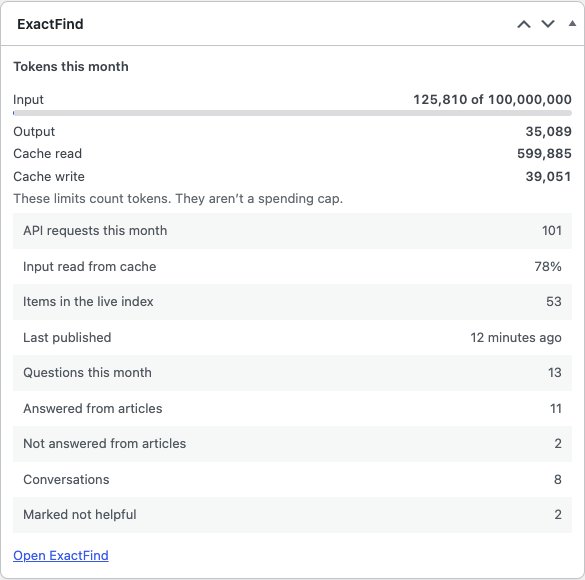
Tokens this month
ExactFind counts four kinds of token: Input, Output, Cache read and Cache write. See Limit AI Usage in WordPress With a Monthly Token Cap for what each one is.
Each kind shows how many tokens you've used this month. If you've set a limit for it, there's a bar and a percentage. The bar turns amber at your alert percentage and red at the limit, which shows as "Limit reached". Kinds with no limit show No limit.
These are token counts, as your provider reports them. They aren't costs.
What each row means
| Row | Meaning |
|---|---|
| API requests this month | Calls to your AI provider |
| Input read from cache | The share of input read from cache, which usually costs less |
| Items in the live index | Items in the published version |
| Last published | How long ago the live version was published |
| Drafts to review | Entries waiting for approval. This row hides when there are none |
API requests aren't the same as questions. An answer usually takes two requests, and each item indexed takes another.
ExactFind Knowledge rows
With question logging on, you also see:
| Row | Meaning |
|---|---|
| Questions this month | Questions logged |
| Answered from articles | Answers that used your articles |
| Not answered from articles | Answers that didn't, which can point to missing content |
| Conversations | Separate chats |
| Marked not helpful | Answers visitors rated No |
These only go back as far as your retention period. With logging off, the widget shows Logging is off.
The ExactFind usage chart
ExactFind Knowledge adds an ExactFind usage widget to the dashboard. It's a chart of tokens per day for the last 7 days, with a colour for each kind. Click Show 30 days to see 30 days, with a table of the figures. Days are in UTC, and the chart covers answers, chat and indexing. Daily figures are kept for 90 days.
The boxes on the settings page
At the top of ExactFind > Settings there are three boxes:
- Tokens this month: a meter for each kind of token.
- At a glance: the model giving answers, whether Turnstile is on, and the rows above. Click the model or Turnstile to go to its setting.
- Daily usage: the usage chart, with ExactFind Knowledge.
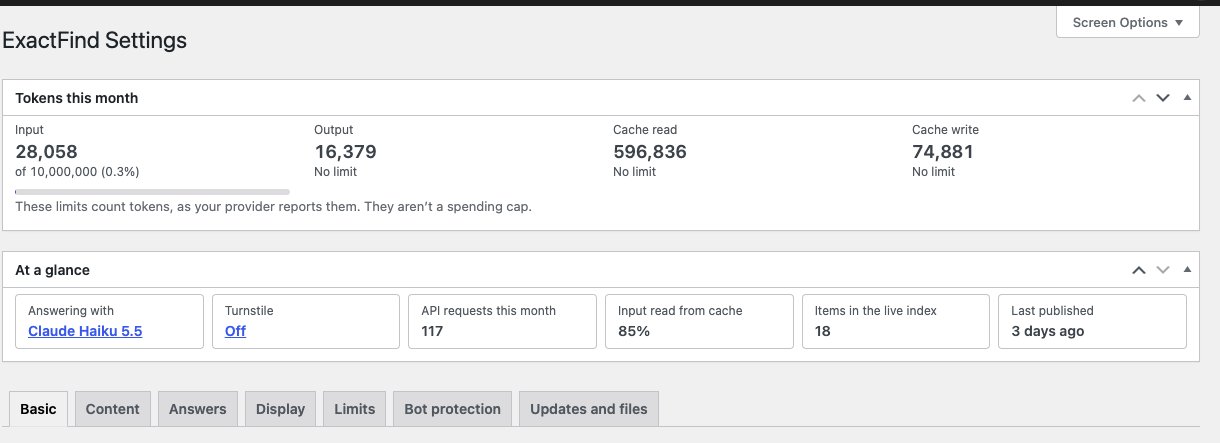
You can drag the boxes into a different order, or collapse one by clicking its heading. To hide a box, open Screen Options at the top right and untick it. WordPress remembers this for each user.
Usage by model
The Index page shows the same meters under Tokens this month. Open Usage by model to see this month's requests and tokens for each model you've used. Usage from before ExactFind recorded models shows as Earlier this month.
Monthly figures reset at the start of each month, in UTC.