The chatbot question log shows what visitors ask, which answers came from your articles, and which ones they rated. It's the quickest way to find content gaps. This needs ExactFind Knowledge.
Turn it on
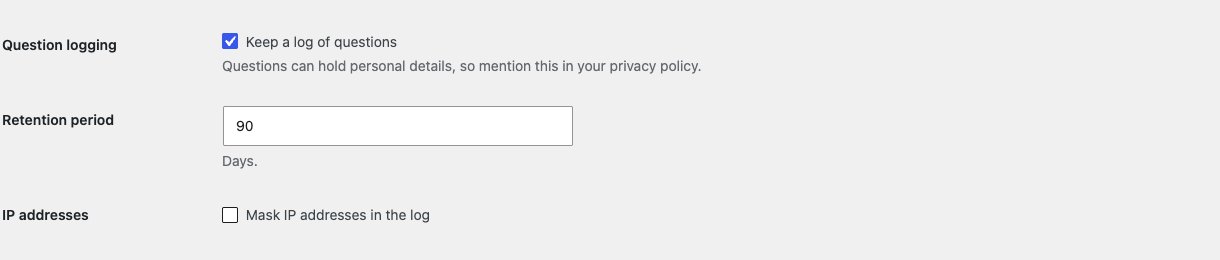
Logging is off by default, because questions can hold personal details.
- Go to ExactFind > Settings > Knowledge.
- Tick Keep a log of questions under Question logging.
- Set your Retention period. The default is 30 days, and the longest is 365.
- Leave Mask IP addresses in the log ticked unless you need full addresses.
- Click Save Changes on that tab.
Update your privacy policy too. See Suggested AI Privacy Policy Wording for Your Site.
Read the log
Go to ExactFind > Question log. Only Administrators can see it. The newest questions come first, 20 to a page. To show more on each page, open Screen Options at the top right and change Questions per page. Times are in your site's time zone.
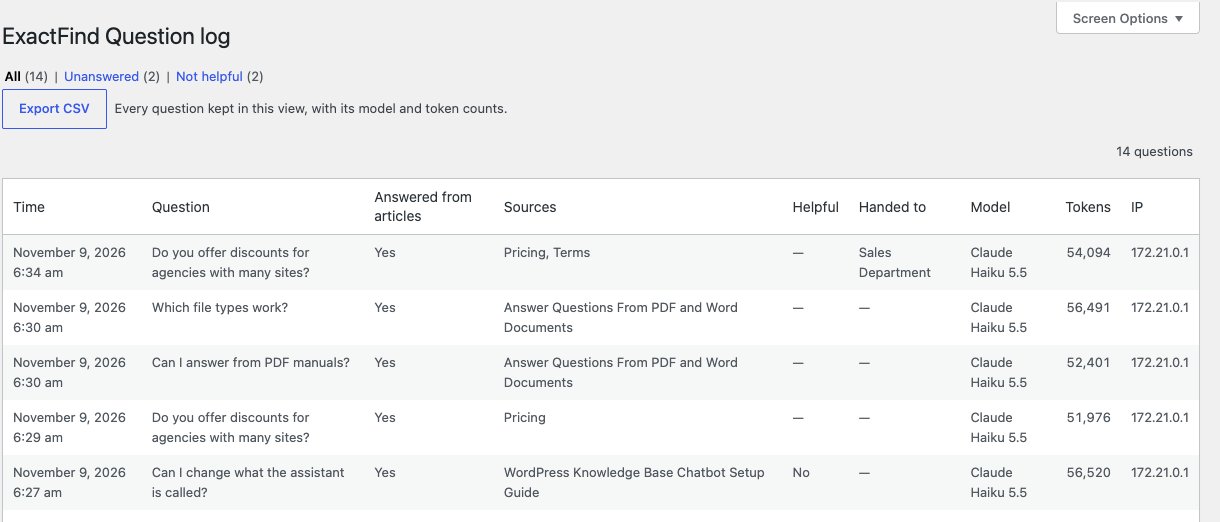
| Column | Meaning |
|---|---|
| Time | When it was asked. Hover over it for the time in UTC |
| Question | What the visitor asked |
| Answered from articles | Whether the answer used your articles |
| Sources | The articles it used. Long lists are cut short, with Show more |
| Helpful | The visitor's rating, if they gave one |
| Handed to | The team the visitor passed the conversation to, if they used Talk to a person |
| Model | The model that answered |
| Tokens | All the tokens the answer used, of every kind |
| IP | Their address, masked if that's turned on |
A dash means there's nothing to show. Questions that couldn't be answered because of a limit or an error aren't logged. Questions asked before the log recorded models show a dash under Model and Tokens.
Export the log
Click Export CSV to download every question kept in the current view, not just the page you're on. Choose a filter first to export only those questions.
The file has the time in UTC, the question, whether it was answered from articles, the sources, a conversation ID, the IP address, the rating, the platform and model, and the input, output, cache read, cache write and total tokens. It has no costs. Questions that start with a character a spreadsheet would read as a formula get an apostrophe in front, so the file is safe to open in Excel.
Find content gaps
Use the filters at the top. Each one shows how many questions it holds.
- Unanswered lists answers that didn't use your articles. Most point to missing content, though this also includes times the assistant asked for more detail.
- Not helpful lists answers visitors rated No. Check these with Why an AI Answer Was Wrong and How to Fix It.
If the same topic keeps coming up, write an article for it, then build and publish the index.
Answer ratings
With logging on, visitors see "Was this helpful?" with Yes and No under each answer. With logging off, they don't see it.

The monthly count of answers marked not helpful shows on the dashboard widget.
How long data is kept
Entries older than the retention period are deleted once a day. Turning logging off stops new entries, but it doesn't delete what's already there. Deleting the plugin removes the log.