Set an AI search rate limit to protect your API key. The search box is public, so anyone could send questions, and every question uses your account.
Go to ExactFind > Settings > Limits.
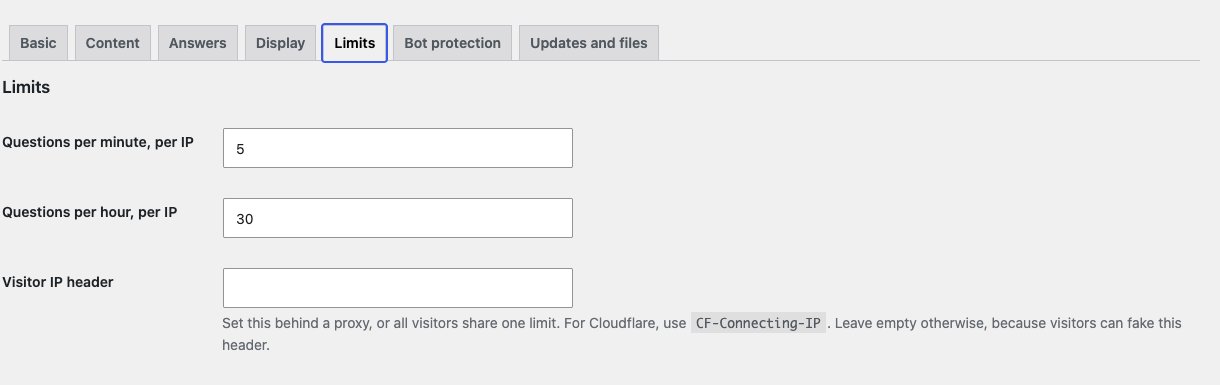
Limits per visitor
| Setting | Default |
|---|---|
| Questions per minute, per IP | 5 |
| Questions per hour, per IP | 30 |
A visitor over the limit sees "You've asked a lot of questions. Please try again shortly."
The limits roll, so a visitor can't double a limit by asking either side of the hour. The count is a close estimate, not exact.
Set the Visitor IP header
If your site is behind Cloudflare or another proxy, WordPress may see the proxy's address instead of the visitor's. Visitors could then share one limit and block each other.
To fix this, set Visitor IP header. For Cloudflare, enter:
CF-Connecting-IPOnly set this if your site is really behind that proxy. Otherwise, a visitor could fake the header and get around the limit.
Limits for the whole site
| Setting | Default |
|---|---|
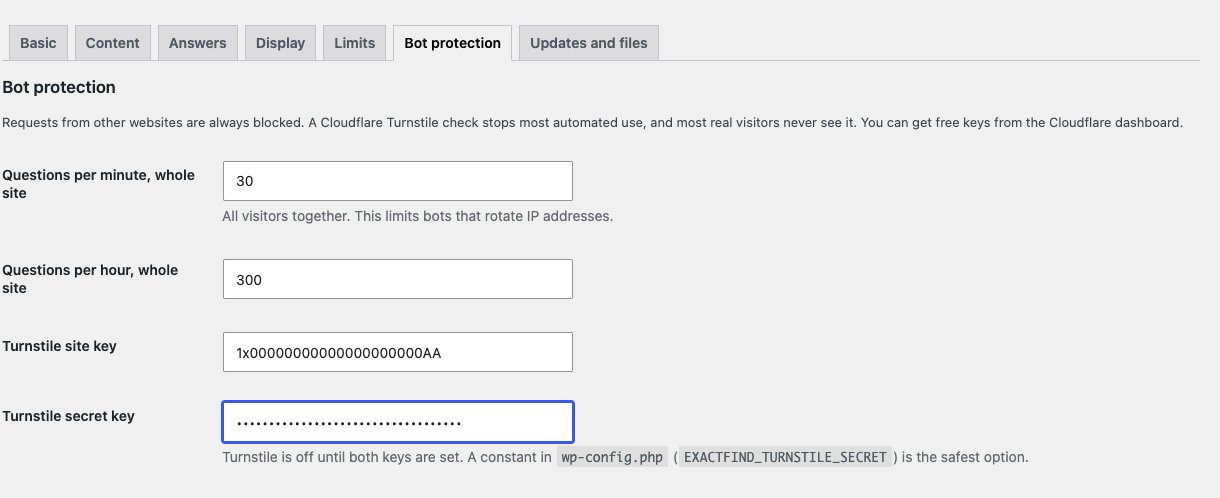
| Questions per minute, whole site | 30 |
| Questions per hour, whole site | 300 |
These count all visitors together, so they limit bots that rotate IP addresses. You'll find them on the Bot protection tab. Visitors over these limits see "Answers aren't available right now". Raise them if you have a busy site.
Add Cloudflare Turnstile
Turnstile is an optional check that stops most automated use, and most real visitors never see it. It's free from Cloudflare.
- Create a widget in your Cloudflare account to get a site key and secret key.
- Add both on the Bot protection tab.
- Save your settings.
Turnstile stays off until both keys are set. A visitor who passes the check isn't asked again for 30 minutes. If Cloudflare can't be reached, questions still go through and the other limits apply.
Hand-off limits
With ExactFind Knowledge's hand-off, sending a conversation to your team has limits of its own: 3 an hour from one visitor's address, 30 an hour for the whole site, and 2 for each conversation. Writing the hand-off summary also counts against your question and token limits.
The per-visitor limit uses the same address as the question limits, so set the Visitor IP header if you're behind a proxy. Otherwise every visitor counts as one, and three hand-offs an hour would stop everyone.
Requests from other websites
ExactFind always blocks browser requests from other websites, so nobody can put your search box on their site and use your account.