The AI answer voice sets how answers refer to your business. You can set it and the maximum answer length under ExactFind > Settings > Answers.
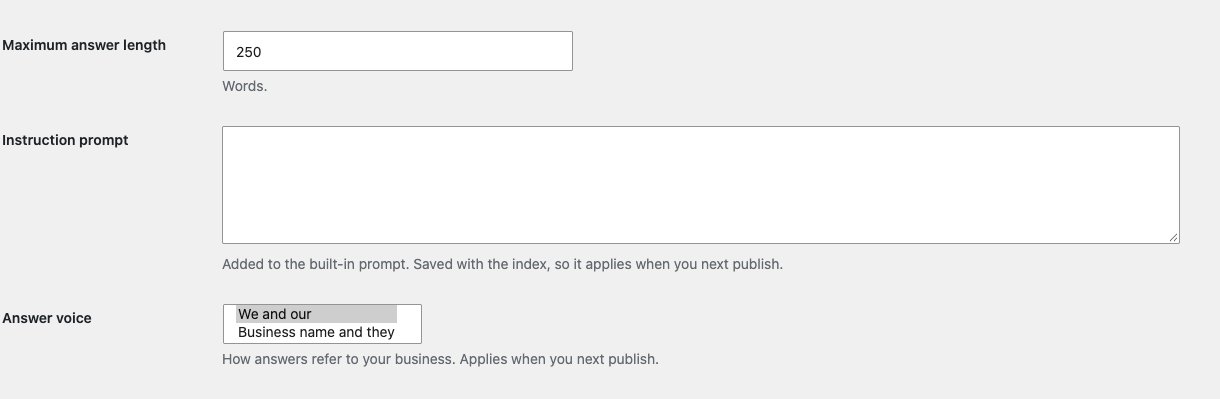
Answer voice
| Option | Example |
|---|---|
| We and our | "We offer a 30-day trial." |
| Business name and they | "Example Co offers a 30-day trial." |
We and our suits a site that speaks for itself. Business name and they suits a site that writes about a business. The name comes from your site title under Settings > General.
Answers also follow these rules, whichever voice you choose:
- They never say "I", "me" or "my".
- They don't mention articles, documentation, guides or pages, or say where a fact came from. The source links do that.
Wording can still vary occasionally, because answers are written fresh each time. In our testing, slips fell from 8 in 18 answers to none once these rules were added.
Maximum answer length
Maximum answer length is 250 words by default, and it can be between 30 and 1,000. Treat it as a guide, as some models run a little over.
Longer answers use more tokens. For a chat, a shorter answer often works better, because visitors can ask a follow-up.
When they apply
Both settings are saved with the index, so they apply when you next publish the index.
Requests to see the instructions
If a visitor asks for the instructions behind the answers, the reply is always "That isn't something that can be shared. What would you like to know about" followed by your site title. This is part of the instructions saved with the index, so publish once after updating ExactFind for it to apply.
Links in answers
Web addresses and email addresses on your own site become clickable in answers. Addresses on other sites stay as plain text, so an answer can't send a visitor somewhere unexpected.
A developer can add other hosts with the exactfind_link_hosts filter:
add_filter(
	'exactfind_link_hosts',
	function ( $hosts ) {
		$hosts[] = 'help.example.com';
		return $hosts;
	}
);
Each host has to be listed in full, because a subdomain doesn't count as your main site.