If an AI answer was wrong, the cause is usually something you can fix in your content or index. Work through these checks in order.
1. Read the source article
Open the article linked under the answer.
- The article is wrong or out of date: fix the article. Then build, approve and publish the index.
- The article is right and the answer isn't: go to step 3.
- The wrong article was used: go to step 2.
2. Check the index entry
ExactFind picks articles from their index entries. If the right article wasn't chosen, its entry may not use the words people type.
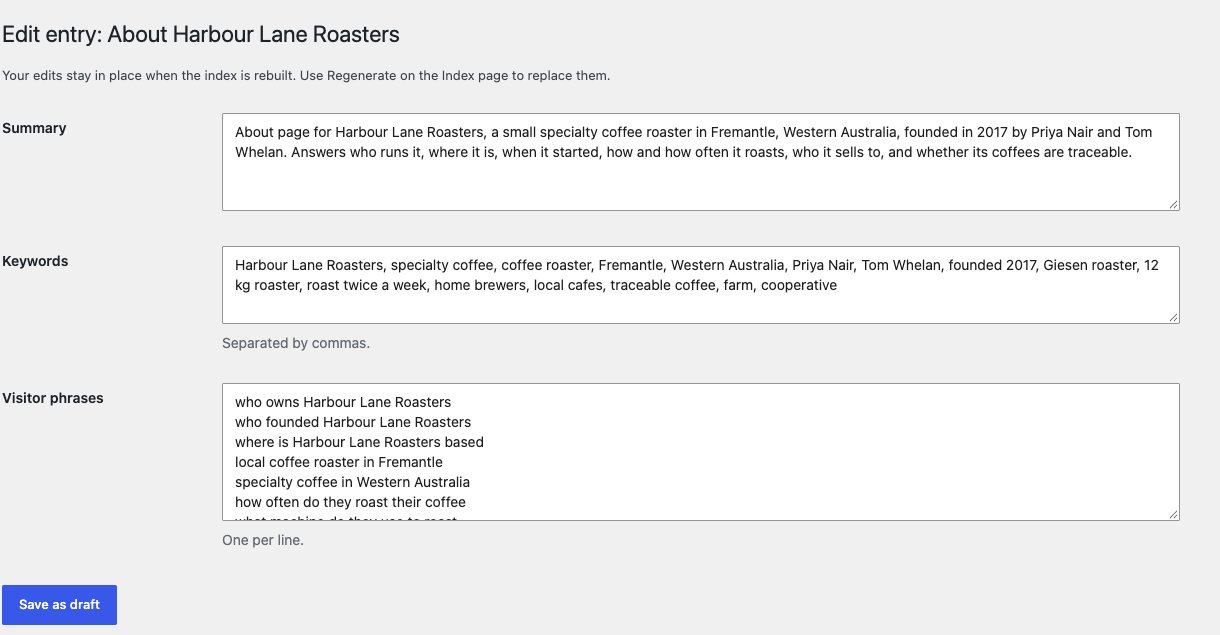
- Go to ExactFind > Index and find the entry.
- Click Edit.
- Add the visitor's wording to Visitor phrases, one per line.
- Save it, approve it and publish.
3. Look for conflicting articles
Search your content for the same topic. If two articles disagree, the assistant can repeat either one. In our testing, this was the most common cause of a wrong answer. For example, one article gave a 25 MB file limit and another gave 50 MB.
Fix the articles so they agree. A broad claim in an article's first sentences matters most, because the assistant tends to repeat it.
4. Check the content exists
If the assistant says it doesn't have the information, the content may be missing, excluded or not yet indexed. Check that the item is published and that the Live column on the Index page says Yes.
When an answer can't fully cover a question, it says what it can and suggests contacting the business. To point people somewhere specific, add a contact to your instruction prompt.
5. Adjust the instruction prompt
If the facts are right but the answer misleads, add guidance under ExactFind > Settings > Answers. For example:
For security questions, state the condition before the answer.Publish the index afterwards, because the prompt is saved with it. ExactFind's own answer rules are saved the same way, so improvements in a plugin update only reach your site when you next publish.
Check the fix
Ask the same question again. Answers can vary a little in wording, so ask it a few times for anything important.
If you use ExactFind Knowledge, the question log shows which questions weren't answered from your articles.