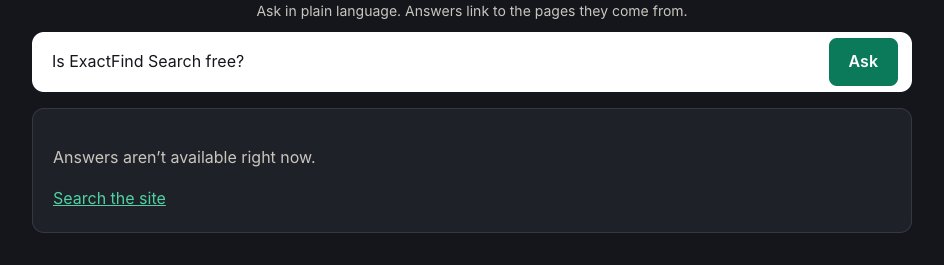
Visitors see "Answers aren't available right now" when ExactFind can't complete an answer. They also get a link to your normal search or contact page, so they aren't left stuck. Here's how to find the cause.
Is an index published?
Go to ExactFind > Index and look under Published versions. If nothing shows as live, build and publish one.
Is an API key set?
Go to ExactFind > Settings > Basic and check the AI provider section. Click Test connection. It checks both answers and indexing. It tests your saved settings, so save any changes first.
If a saved key can't be read, a notice asks you to enter it again. This happens if your site's security salts change.
Have you reached a token limit?
There are four monthly limits, one for each kind of token, and answers stop when any of them is reached. Check the meters at the top of the Index page or the settings page. A limit that's been reached shows "Limit reached" in red. Raise it, empty it, or wait until next month. See Limit AI Usage in WordPress With a Monthly Token Cap.
Is the site over its whole-site limit?
When all visitors together go over the limits on the Bot protection tab, visitors see this message until the count drops. Raise the limits if your site is busy. See Set an AI Search Rate Limit to Stop Abuse.
Is your AI provider having a problem?
The message also appears if your provider returns an error, for example if your account has run out of credit or the provider has an outage. It also appears if your provider's spending limit has been reached. Check your provider's account and status page.
Did the provider decline the question?
AI models occasionally decline a request. This shows the same message for that question only, and other questions keep working.
Has the Knowledge licence lapsed?
If ExactFind Knowledge has had no active licence for 14 days, its features switch off. Answers then come only from posts and pages, and a notice on the Plugins screen and dashboard says so. If your content is all in custom post types or documents, nothing is left to answer from, so visitors go straight to your normal site search. See Activate Your ExactFind Knowledge Licence.
Is AI switched off for the site?
WordPress lets a site turn off AI features with the WP_AI_SUPPORT setting. ExactFind respects it, so check your wp-config.php if answers never work.
Still not working?
Turn on WP_DEBUG and WP_DEBUG_LOG in wp-config.php and ask a question. Provider errors are written to the debug log.