You can exclude pages from AI search so ExactFind never summarises them or answers from them. Exclude content before your first build, so you don't pay to summarise it.
Exclude by category, tag or ID
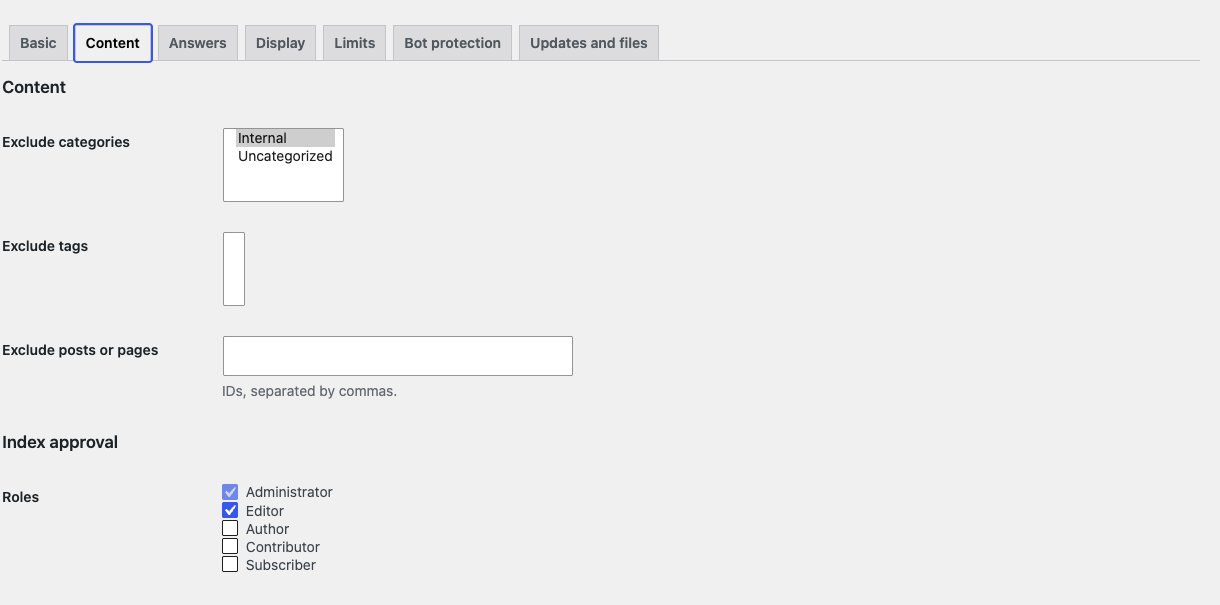
Go to ExactFind > Settings > Content.
| Setting | What it does |
|---|---|
| Exclude categories | Leaves out posts in the chosen categories |
| Exclude tags | Leaves out posts with the chosen tags |
| Exclude posts or pages | Leaves out items by ID, separated by commas |
To find an ID, open the item in the editor and look for post=123 in the address.
Exclude by taxonomy term
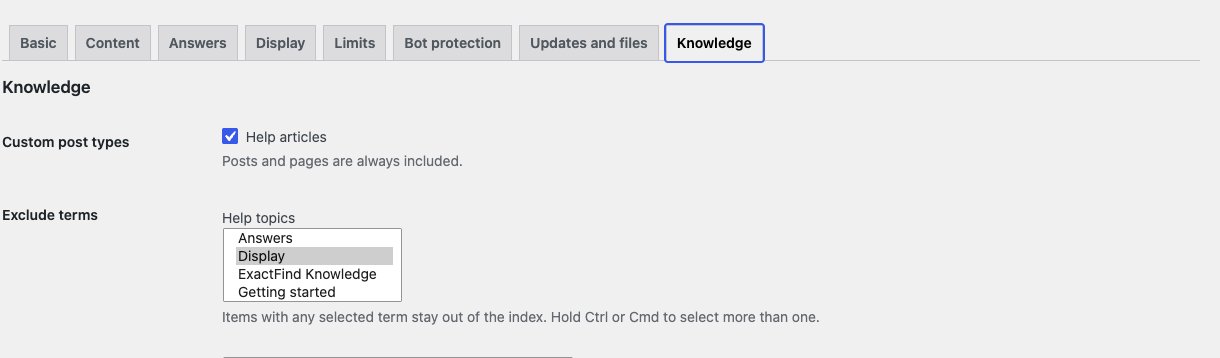
With ExactFind Knowledge, you can exclude custom post type items by term, such as a doc_category.
- Go to ExactFind > Settings > Knowledge.
- Under Exclude terms, select the terms. Hold Ctrl or Cmd to select more than one.
- Click Save Changes on that tab.
An item with any selected term stays out. Exclude terms only shows once you've saved a custom post type that has public terms. See Add Custom Post Types to AI Search in WordPress.
After you exclude something
An excluded item stops being used for answers straight away, but its entry stays in the live index until you act.
- Go to ExactFind > Index and click Build index. The entry is marked stale.
- Click Publish approved entries to drop it from the live index.
If you remove the exclusion later, the next build processes the item again.
Exclusions or Remove from index
- Exclusions suit a group of items, and they cover new items too.
- Remove from index suits a single entry. See Edit an Index Entry, Regenerate It or Remove It.
What's left out anyway
Drafts, private items and password-protected items are never indexed, so you don't need to exclude them.
Forms, embeds, galleries and ExactFind's own search box are also left out of the text that's read. See How the AI Search Index Works in ExactFind.
Leave out shortcodes
This section is for developers. ExactFind runs shortcodes when it reads your content. To leave out a shortcode, such as one that prints a member price or a booking widget, add it to the exactfind_index_skip_shortcodes filter in your theme's functions.php or a small plugin:
add_filter( 'exactfind_index_skip_shortcodes', function ( $tags, $post ) {
	$tags[] = 'member_price';
	return $tags;
}, 10, 2 );
Add to the list, rather than replacing it, so forms and embeds stay out.
To remove every shortcode instead, as ExactFind Search 0.2.6 and earlier did, return false from exactfind_index_run_shortcodes:
add_filter( 'exactfind_index_run_shortcodes', '__return_false' );Both filters are passed the post, so you can decide item by item. Rebuild the index after you change either one.