ExactFind Knowledge can answer from PDF and Word documents in your Media Library, such as manuals, policies and price lists. A long document is split into sections, and each answer reads only the sections it needs.
Supported files
PDF, Word (.docx), rich text (.rtf), OpenDocument text (.odt), plain text, Markdown, HTML and CSV.
Older Word files (.doc) and spreadsheets other than CSV aren't supported. Save them in one of the formats above first.
Before you add a document
Media Library files can be opened by anyone with the link, and answers link to the document they used. Only add documents you're happy for visitors to read.
Add documents to the index
- Upload the documents to the Media Library, if they aren't there already.
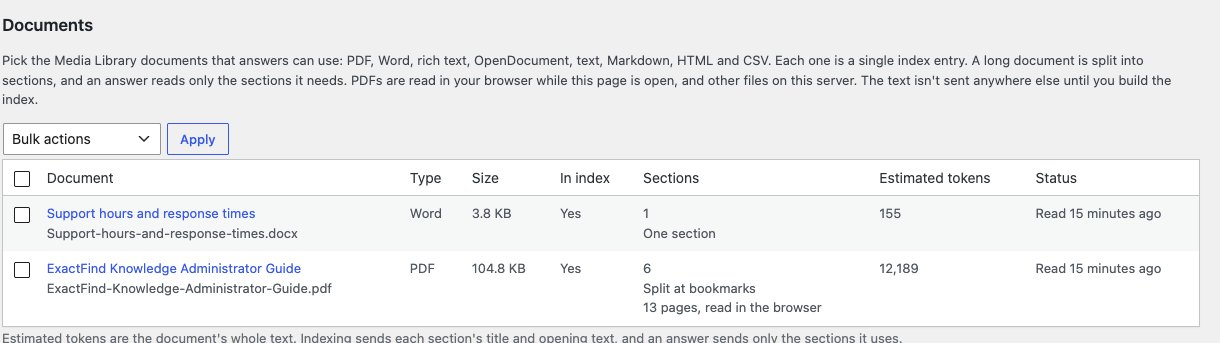
- Go to ExactFind > Index and find Documents.
- Tick the documents you want.
- Choose Add to index from Bulk actions and click Apply.
- If any are PDFs, keep the page open while they're read. See How PDFs are read.
- Click Build index, then review and publish the new entries.
To add new uploads automatically, tick Add new uploads to the index under New documents on the Knowledge tab. Only files uploaded by someone who can manage the index are added. They still need a build and approval.
The Documents list
| Column | What it shows |
|---|---|
| Document | The title and file name |
| Type and Size | The file type and size |
| In index | Whether it's added |
| Sections | How many sections it was split into, and how. For a PDF, the page count and where it was read |
| Estimated tokens | The size of the whole text. Indexing sends each section's title and opening text, and an answer sends only the sections it uses |
| Status | Whether it's been read, and any problem |
How a document is split
A short document stays as one section. A longer one is split so that an answer can read just the part it needs:
- Word, rich text, OpenDocument, HTML and Markdown split at their headings, or into equal parts if they have none.
- CSV files split into groups of 60 rows, with the column headings kept for each row.
- PDFs split at their bookmarks, or by their printed contents page, or at headings, or into runs of pages. Long chapters split again at their sub-bookmarks. Running headers and page numbers are removed.
A document can have up to 200 sections. If it has more, only the first 200 are used, and the list says so.
Documents with proper headings or bookmarks split best. If yours splits into equal parts or runs of pages, adding headings or bookmarks will usually give better answers.
How it's answered from
Each document is one entry in the index, with a one-line summary for each section. When a question fits a document, the AI first reads its list of sections, then asks for the ones it needs, up to six and about 6,000 tokens. The answer is written from those sections alone.
Answers link to the document. For a PDF, the link opens at the page the answer used.
How PDFs are read
PDFs are read in your own browser, while the Index page is open. Each one shows "Reading page" as it goes. When they're done, reload the page to see their sections.
If no browser reads a new PDF within 15 minutes, your server reads it instead through WP-Cron. The server can read PDFs up to 25 MB. Larger ones need the Index page open.
Either way, the text stays on your site until you build the index. Nothing is sent to an outside service to read it.
When a document changes
If you replace a file, the list shows "Changed since it was read". Tick it and apply Read again, then build and publish the index.
Remove a document
Tick it and apply Remove from index. It leaves answers once you build the index and publish.
Problems reading a document
| Status | What to do |
|---|---|
| "The file is larger than the 20 MB limit in the Knowledge settings." | Raise Largest document on the Knowledge tab, up to 200 MB, or use a smaller file |
| "The PDF is password protected." | Save a copy without a password and upload that |
| "No text was found. It may be scanned pages" | The PDF is images of pages, with no text to read. Use a version with real text, or run it through OCR first |
| "The PHP zip extension is needed to read this file." | Ask your host to turn on the PHP zip extension, needed for Word and OpenDocument files |
| "Reading stopped partway" | The server ran out of memory or time. Open the Index page so your browser can read it, or use a smaller file |
| "The PDF has more than 2000 pages." | Split it into smaller files |
| "This browser couldn't read it. It will be read on the server." | Nothing. The server reads it within 15 minutes |
If the licence lapses
Documents need an active ExactFind Knowledge licence after the first 14 days. If it lapses, documents drop out of answers, but their entries stay in the index and come back when the licence is active. See Activate Your ExactFind Knowledge Licence.