This ExactFind quick start takes you from a new install to your first AI answer. It should take about 15 minutes, depending on how much content you have.
Before you start, install the plugin and have an API key from your AI provider ready.
1. Choose a platform and add your API key
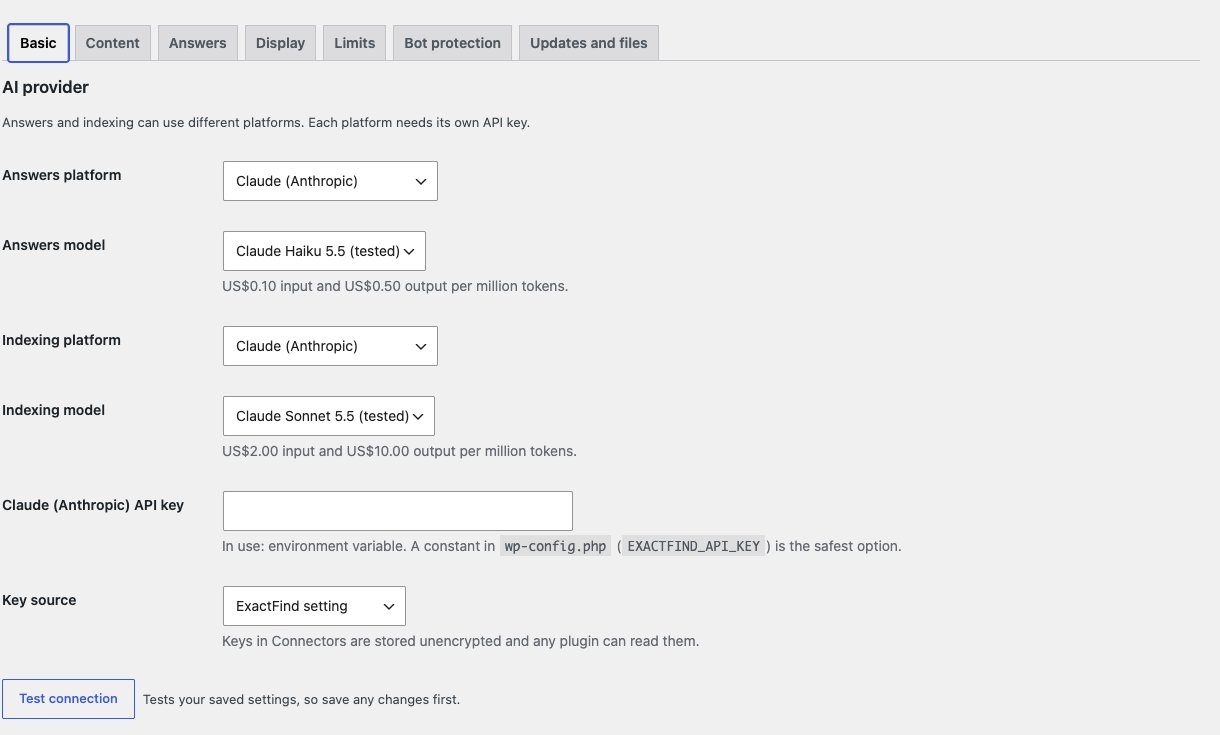
Go to ExactFind > Settings. The page shows a usage summary, with tabs below it: Basic, Content, Answers, Display, Limits and Bot protection. With ExactFind Knowledge, there's a Knowledge tab too. The main tabs share one Save Changes button, and the Knowledge tab has its own.
On the Basic tab, under AI provider:
- Choose a platform and a model for answers, and the same for indexing. For Claude and ChatGPT, pick models from the menu, and the defaults are a good start. An OpenAI-compatible service, such as Grok, OpenRouter, Mistral or Groq, also needs a base URL, a service name and a typed model ID.
- Add your key. Each platform has its own key field.
- Click Save Changes, then Test connection.
A model marked "(tested)" has passed our test questions for that job. A model can be tested for answers, for indexing or for both, so the label depends on the menu. See Choose an AI Platform and Model for WordPress Search.
2. Build the index
Go to ExactFind > Index and click Build index. Keep the page open until the count reaches zero. See Build an AI Search Index for Your WordPress Site.
3. Review and publish
Read through the entries, then click Approve all drafts and Publish approved entries. See Review Index Entries Before They Go Live.
4. Add a search box
Create a page and add the ExactFind Search block, or this shortcode:
[exactfind]See Add AI Search to WordPress With a Block or Shortcode for other options.
5. Ask a question
Open the page and ask something your content covers. You should see an answer with links to your articles.
If you see "Answers aren't available right now", see Fix "Answers Aren't Available Right Now" Errors.
Before you share it
- Set your limits. See Set an AI Search Rate Limit to Stop Abuse and Limit AI Usage in WordPress With a Monthly Token Cap.
- Tell visitors how their questions are handled. See Suggested AI Privacy Policy Wording for Your Site.